Serve and preview your docs
docs-builder includes a local development server that renders your documentation and reloads in real time as you edit. This is the fastest way to preview your work.
From the root of a repository containing a docset.yml:
docs-builder serve
This starts a local server at http://localhost:3000. Open it in your browser to see your documentation.
The development server watches your documentation directory and reflects changes instantly — no manual rebuild needed. This applies to:
- Content changes — editing, adding, or deleting Markdown files
- Navigation changes — modifying
docset.ymlortoc.yml(see content set configuration and navigation) - File moves — renaming or relocating files within your docs tree
- Configuration changes — updating frontmatter, substitutions, or other
docset.ymlsettings
Every change triggers an automatic reload in the browser. You never need to restart the server during a normal authoring session.
docs-builder serve uses a two-pronged approach to give you both speed and completeness:
On-demand page rendering — when you navigate to a page, it is compiled and served right then. This keeps page loads fast because only the page you're viewing needs to be built.
Full background build — simultaneously, a complete build runs in the background across your entire documentation set. This surfaces diagnostics for all pages — not just the one you're looking at.
The result is a diagnostics HUD that appears at the bottom of your browser window:

Click Show Console to expand the full diagnostics panel with detailed error locations and messages:
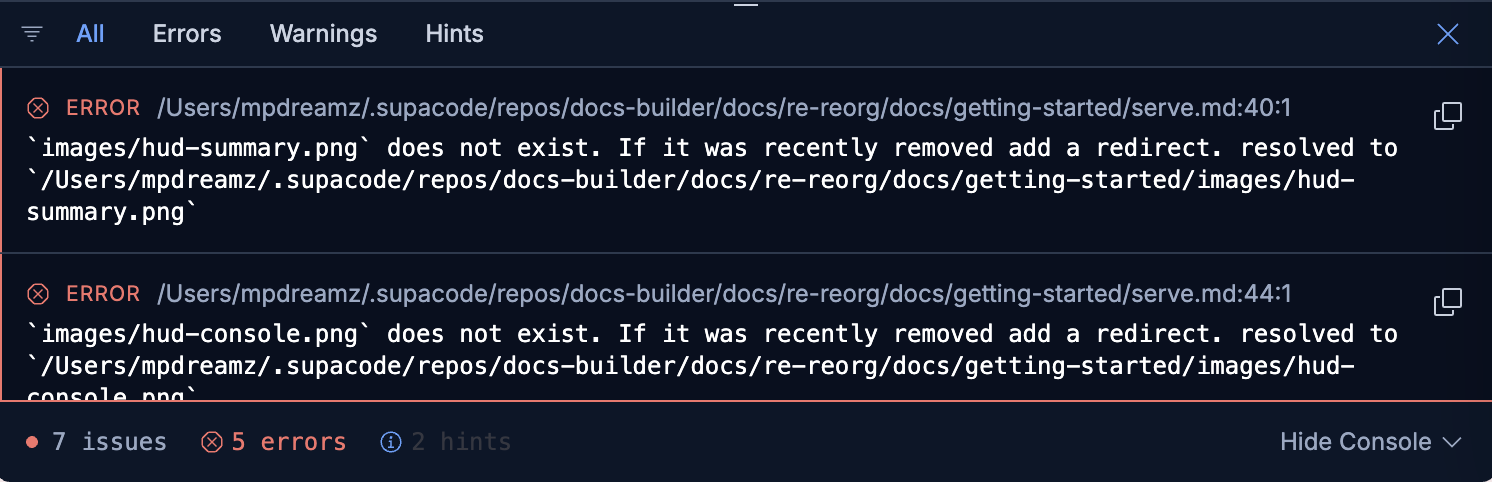
The HUD surfaces errors and warnings ahead of time — broken links, missing files, invalid directives — so you can fix issues before they reach CI. This significantly shortens the development cycle compared to waiting for a full build to complete.
- Port conflicts — if port 3000 is in use, pass
--port <number>to pick a different one. - Cross-link validation — even in local serve mode, cross-repository links are validated against published link indexes. See isolated builds for details.
- API docs — API Explorer content is generated on startup. Use
--skip-apifor faster iteration when you're not working on API reference pages.